
How to give someone access to your Google email and data; manage your digital afterlife

Google Inactive Manager is a recent introduction by Google to allow account holders to share their email and data with a nominated next of kin or friends after they have died or have stopped using Google services. A previous post looks at the pros and cons of using Google Inactive Manager and why you might want to do so. Here’s a step by step guide to help you this up this function…

Setting up Google Inactive Manager

Go to your Google homepage, click on your profile or avatar picture at the top right hand side of the page and select ‘Account’ after your name. You’ll need to be logged in to set up this feature.

Once in your ‘Account’ page, select the ‘Data tools’ option at the top of the page and then click on ‘Set up Inactive Google Manager’.

google_data_email_digitalafterlife_death

You’ll be presented with the Google Inactive Manager dashboard. Click on ‘Set up’ to get started.

google_inactive_data_email_digitalafterlife_death

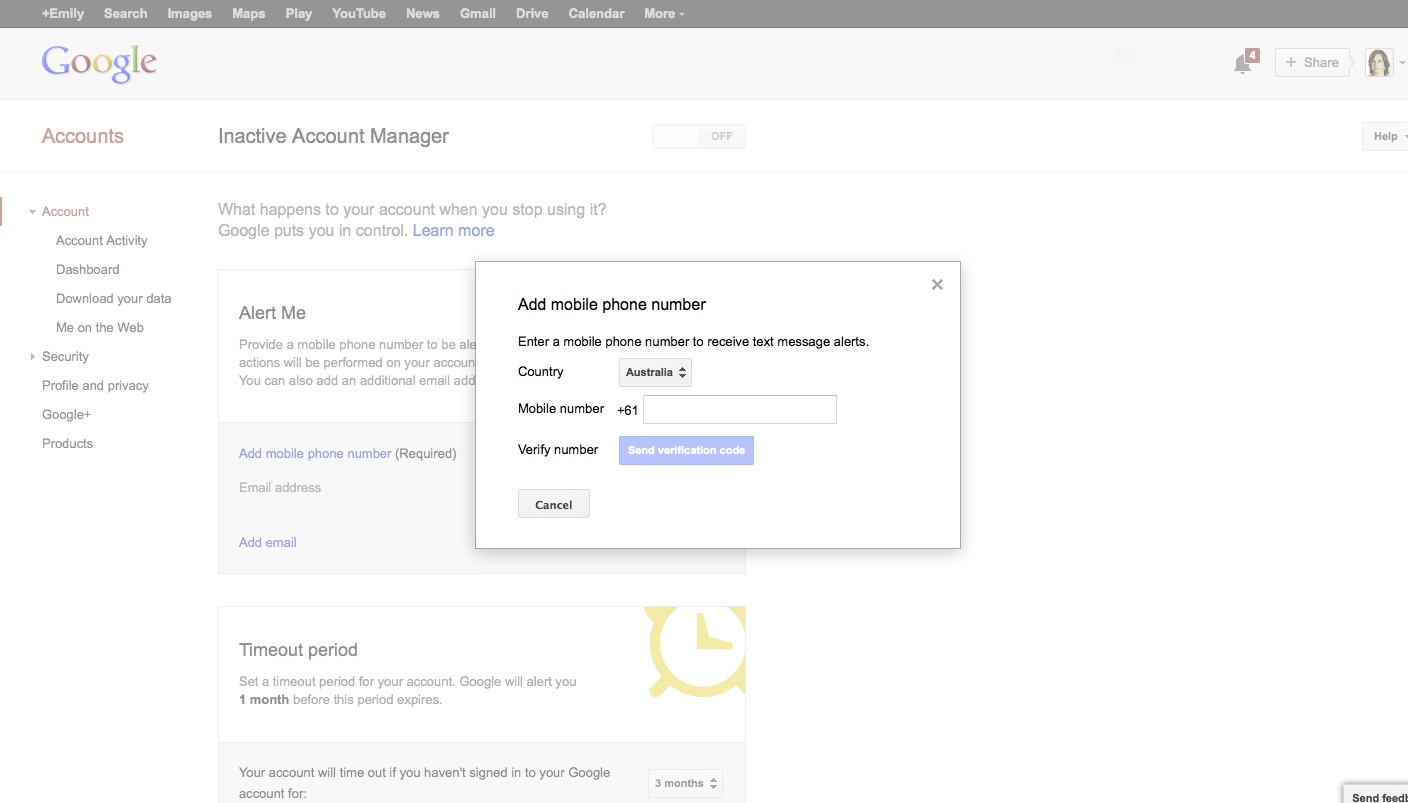
First you’ll need to provide a mobile phone number. Click on the ‘Add mobile phone number’. The system is intuitive so it doesn’t matter if you type in a zero after the country code or leave spaces between numbers.

Once done, hit the ‘Send verification code’ button – it should send a code to your phone via SMS which consists of a series of numbers or letters and numbers. Add to the ‘Verify number’ box which appears and click ‘Confirm’.

You can also add another email address to receive updates or alerts at this point.
mobile_phone_number_google_inactive_digitalafterlife_death

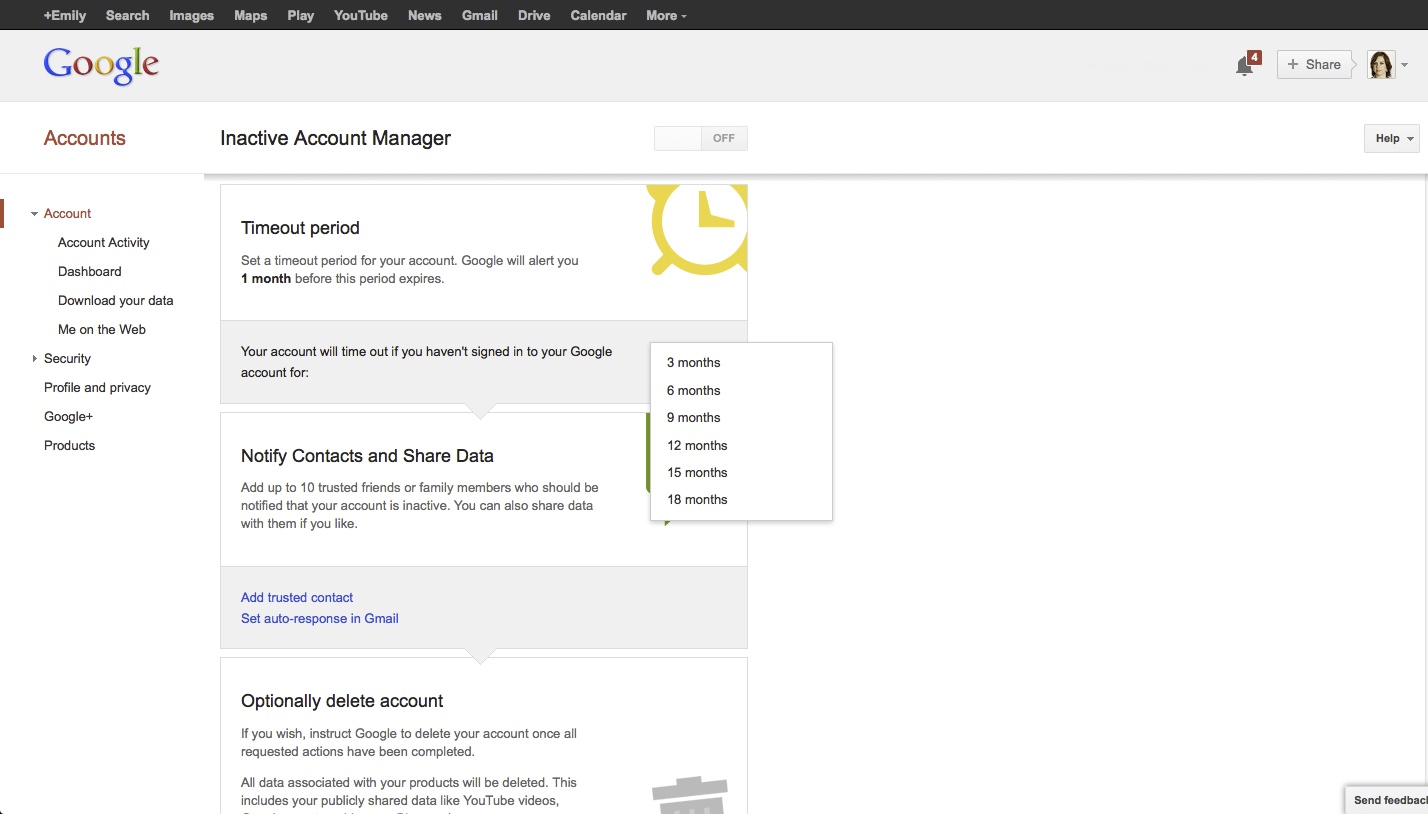
Once you’ve provided your contact details, select a timeout period on the Google Inactive Manager homepage. This means the length of time that you leave your Google account inactive, i.e. the period during which you do not log into Google for email, search, Google+, Drive or any of the Google tools. The minimum period is 3 months, the maximum period is 18 months. Think of the feature you most commonly use on Google and base a time period around that.

Remember though, Google only knows that you’ve used your account if you have logged into your account. If you use Google search everyday but are not signed in then you check your email every six months which you have to sign in for, Google will register the six month email activity on your account but not the search.
google_inactive_account_manager_time_digitalafterlife

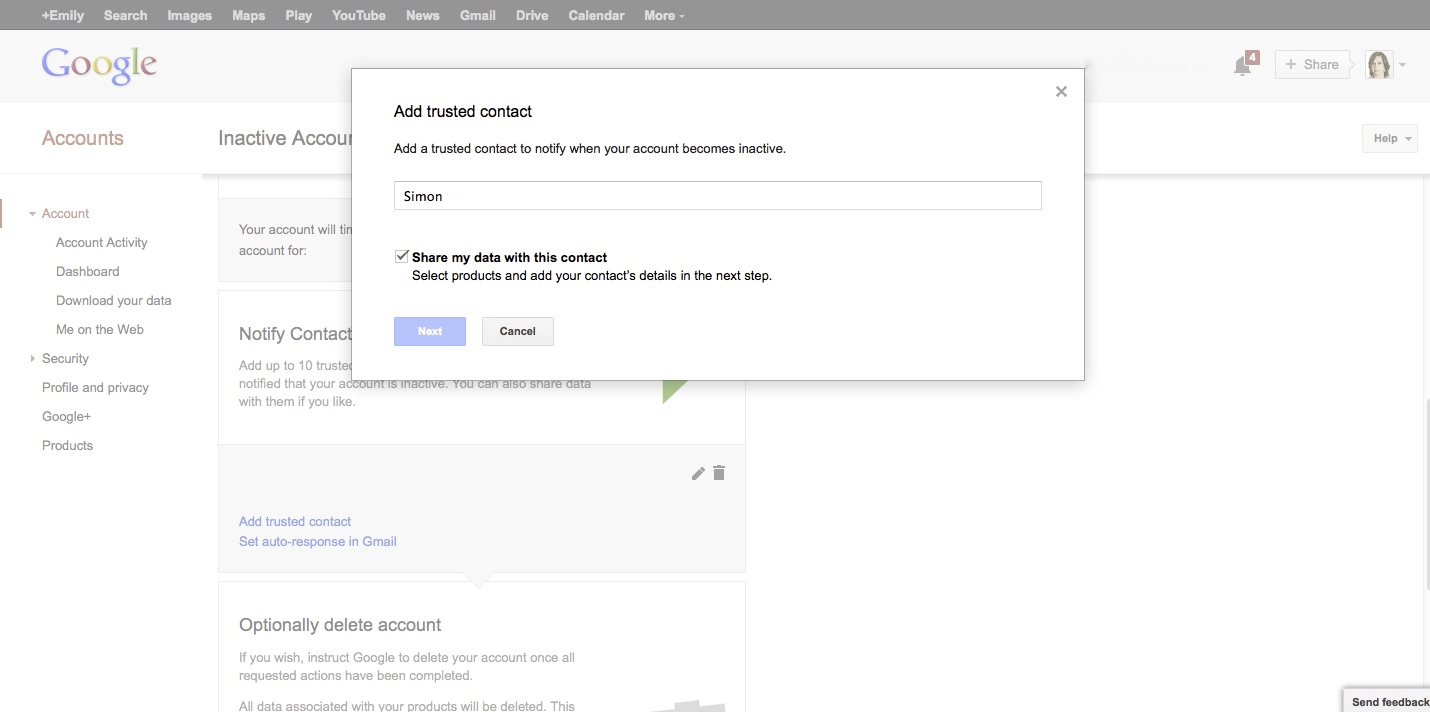
Next, select ‘Add trusted contact’. You can nominate up to 10 contacts who will have three months to download your data once the account is inactive. Here’s where you can enter the email details of the person(s) you nominate to receive your data. Check the ‘Share my data with this contact option’ to ensure that they are able to receive the data later. If there is someone that you don’t want to have access to your email or other Google data but would like to send them a message, you can add a note for them at this point which the recipient will receive when the timeout period has finished.
 add trusted contact

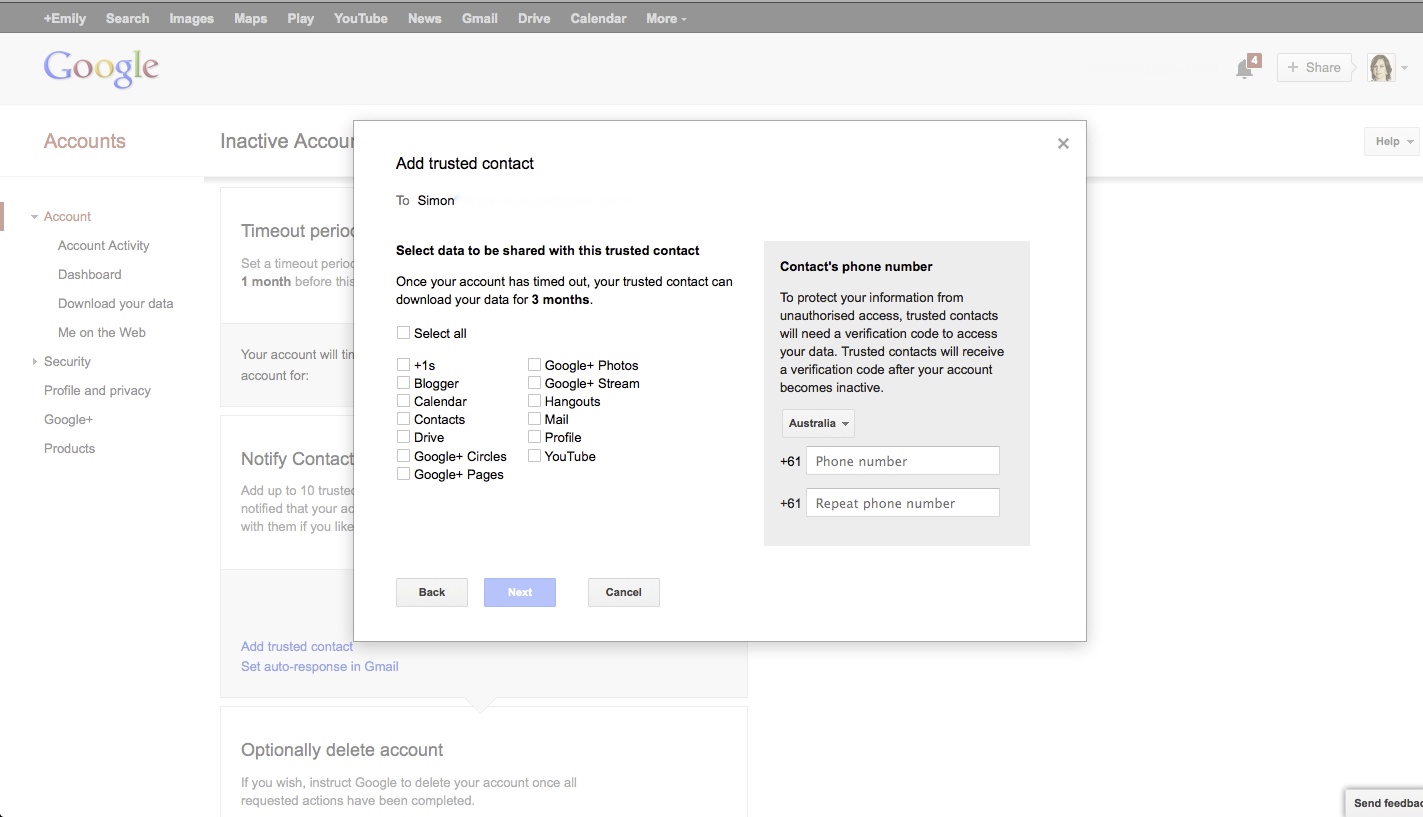
Select the Google data that you would like your nominated person(s) to download. As well as making sure your contact details are correct, you’ll need to verify the correct phone number for your nominated contact(s). You’ll also need to update your contact’s mobile phone if this changes over time so that they will be able to access your account once it has become inactive. You can pick and choose what your nominated contact(s) will be able to download and access.
nominating_receive_email_data_google

After hitting the ‘Next’ button, you’ll be taken to a page where you can leave a message for the person you’ve nominated to receive your Google data. While setting up Google Inactive Manager is practical, the message doesn’t have to be. It’s a good opportunity to leave a thoughtful message behind for someone who is grieving. What would they want to hear? Anything you want them to know? What you say could make a difference to them.

google_note_contact_digitalafterlife_death_message

Google Inactive Manager also allows you to set up an auto-response to incoming email once your Google account has become inactive.
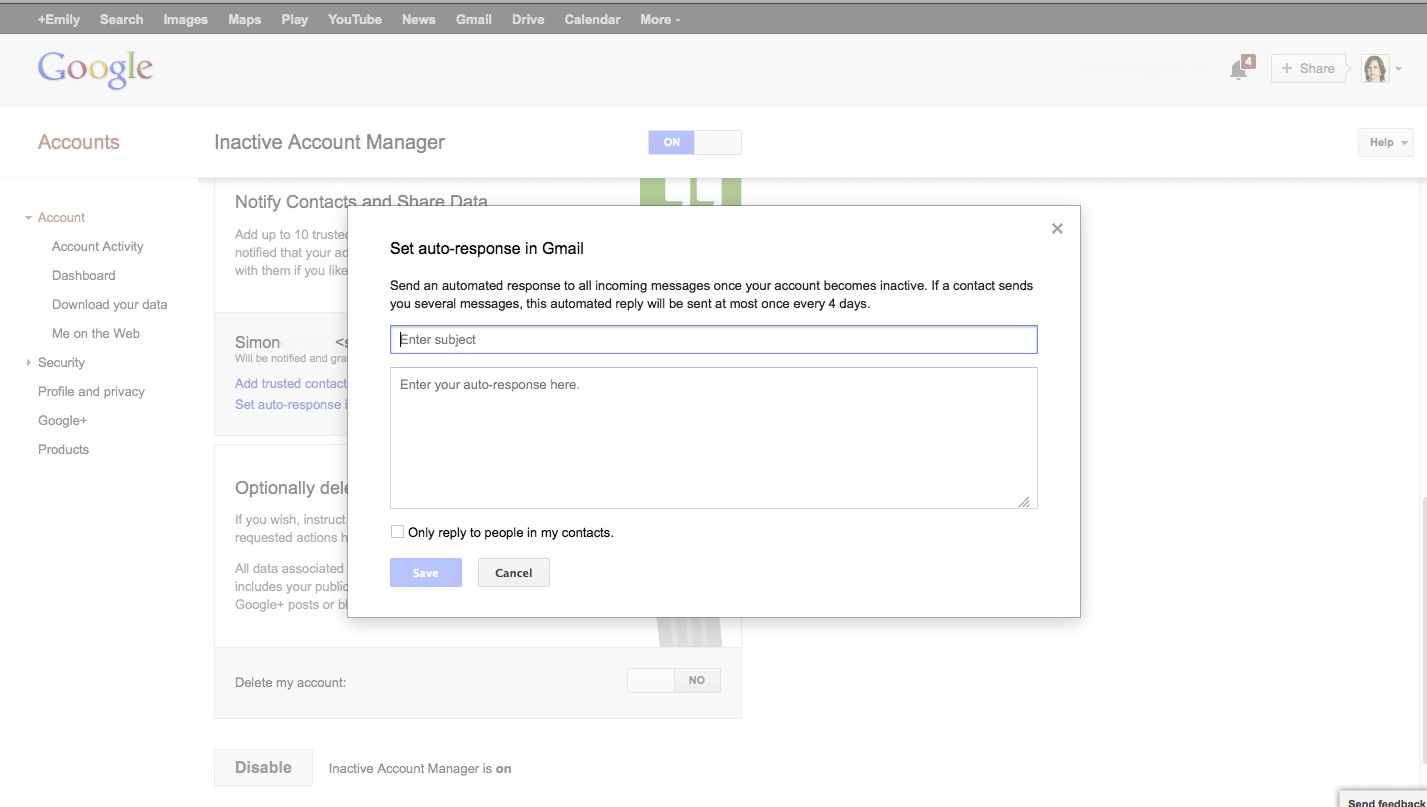
autoresponse_google_inactive_digitalafterlife_death

Lastly, you decide what happens to your Google account once your outlined actions have been completed. Would you like the account to be deleted? Google Inactive Manager includes this option which will also remove any public comments/data you have, for instance on YouTube or Google+.

opt_delete_google_account_digitalafterlife_deathOnce you’ve hit ‘Enable’, your Google settings are confirmed. Remember, you are able to update your settings at any point. Visit this earlier post on things to consider when setting up Google Inactive Manager.

What happens to Google email & online information when someone dies?

When people lose someone close to them, they frequently seek to find out more about what they were thinking or doing before they died. It’s as though they are trying to get a complete sense of the person and how they related to everyone else and the world around them.

Accessing secure information such as email is one way that mourners have sought to do this. However until recently, Google has restricted the ability of family members to see account information of the relatives who have died. It has required a legal process. The company has stated that their focus is to consider the privacy of users who sign up to their services – whether living or dead.

This changed in April 2013 when Google announced that their users are now able to nominate a next of kin or someone close to them which allows them access their account data if the account has been inactive for a period of three or more months. It’s called Google Inactive Manager. This will potentially be an enormous comfort for families trying to delve into their loved ones’ histories, sparking memories as well as a greater understanding of who they were. But what are the consequences? Could it in fact open Pandora’s box?

Why family members may want access to your emails and information

Earlier this year, my folks and I visited an army barracks in Catterick, UK to see some soldiers that my brother, DBS, helped to recruit to his Battalion. It was a good day, meeting some of the officers that he served with and finding out more about the customs, traditions and the way of life that he became part of.

Chatting with one of the officers over lunch, he told me that one of the most common questions that families ask when dealing with the news that they have lost someone while on active duty is “did he or she receive my parcel?” They want to know if their son, daughter, spouse or sibling knew that they were in their thoughts and were loved. Even if the recipient hadn’t had a chance to consume or open the package, their families are relieved and grateful if they know it was received. The gift symbolises their act of thinking about and loving them.

I was immediately struck by this conversation and could relate to what the offer had said. When I was informed of my brother’s death, my first response was “did he know that I loved him?” not long followed by “but I haven’t sent him his parcel,” a box of goodies that I’d bought a few days prior but hadn’t yet mailed.  It is a deeply held regret.

By contrast, I knew that my brother had thought of me. Two days later a postcard arrived from him that had taken some time to arrive from overseas, telling me not to worry and that he and his boys were well trained and prepared. He would see me soon. I could hear his voice as I read it and I felt a combination of being elated because I had received his thoughtful message and devastated because its timing was like a punch in the stomach.

I had sent DBS several emails in the month prior to his death to his Google gmail account. However, because of the nature of his work, I wasn’t sure that he had received them. He hadn’t replied. Army representatives at his repatriation and funeral, tried to assure me that he may have read them. “Camps often have internet”, they said. “Perhaps he was able to check into his account between duties”.

It wasn’t something that I was able to find out definitively from Google though. Initial enquiries by the MOD (Military of Defence) and ourselves to access his account were rebutted.

DBS was old fashioned in his approach to communicating with friends. He wrote pen on paper letters and mailed them to friends and family. By contrast, I preferred online forms of communication such as email and social and now believe as a result, that a significant period of my personal history has been lost.

By committing his words down on a card, I had a record of his thoughts for me. They were there in black and white. In my initial stages of grief, not knowing whether or not he had received my correspondence meant I had no guarantee — for a while — that he knew mine for him.

Respecting someone’s privacy while managing a digital estate

In military life, it’s a common ritual to send parcels and mail to men and women in the field. Increasingly though in our digital age, emails and notes through social networking platforms have primarily become our means of communicating, symbols if you like, that convey we’re thinking of others. Given this trend, it’s no wonder that we want to see these sent and received messages from behind a username and password.

In an earlier post, I mentioned how our family wanted to respect DBS’s privacy when handling data stored on his laptop with our desire to find out more about him. We did this by asking a third party to look through its contents, separating the information he would have wanted us to see from the notes and conversations that he would likely preferred we didn’t.

We would have applied the same practice to his email handling if we had been allowed to. This is certainly something I would recommend to families going through this experience of looking through email data of someone who has died, whether they access this information via the Google Inactive Manager or have obtained the right to read it through as the result of a legal process.

Being able to access a deceased person’s Google account data will likely be beneficial when managing their estate if gmail is their principal personal email account. For instance, resetting unknown passwords to 3rd party services such as iTunes, online banking, other social networking accounts is largely done via email.

There are also potential downsides to reading through someone’s private history and relationships. By looking through these archives, you are likely to become privy to a world inhabited by all kinds of private conversations. People often have secret lives, or have done things or have feelings that the people closest them may not know about. Even if this is not the case, online conversations can easily be misinterpreted.

Google Inactive Manager – features & things to consider when setting this service up

Things to consider when setting up Google Inactive Manager

Google Inactive Manager is a recent introduction by Google to allow account holders to share their email and data with a nominated next of kin or friends after they have died or have stopped using Google services. A previous post looks at the pros and cons of using Google Inactive Manager and why you might want to do so. Here are some additional things to think about when setting this up this function…

Google’s decision to make a user’s private data available to people they have nominated is a positive one, especially if users are considerate in how they manage their settings, balancing their privacy v. providing information that would be practical or of comfort in some way, to their friends and relatives.

Having trialled this feature recently, here are some considerations if you decide to take advantage of this function.

Google Inactive Manager allows you to decide what Google features and data your next of kin/family members/friends can download in the event of your death.

Think about what you want to share. You may want to reveal data from your blog or Google+ circles to those you’ve nominated but not your email. When signing up, there’s a full checkbox list of Google features. Just check the information areas that you would like to disclose.

With this kind of digital estate planning, tell your closest kin what you are planning to do and what information you’ve nominated. This way you can discuss what your decision means and there are no surprises later in the event that something happens to you. On a purely practical note, your Google account needs to be inactive for at least three months before your nominated party can download your data. Discussing the steps that you have taken with them means that they may avoid running around in administrative or legal circles trying to obtain this account information in the meantime.

Google Inactive Manager only applies to gmail accounts – i.e. your nameorxxxx@ gmail.com

Email accounts hosted by Google but which are instead Gmail accounts with Google Apps (for instance, a business email address), are not supported by this service. For a Google Apps account, you’ll need to consider an alternative means of sharing data, for instance by setting up someone you trust as an admin on your account. If you have set up multiple personal Gmail accounts (i.e. name@gmail.com) you can set up Google Inactive Manager for each of these.

Google Inactive Manager will set into action if you stop using Google and don’t make the service inactive again.

It’s important to check in and update this service regularly to ensure that it is reflective of your digital afterlife wishes.  Your next of kin or the friends you want to nominate may change over time as may the level and type of information you want to share.

You can choose more than one person with whom you share your data. It’s not immediately obvious but if you wish to change the Google information that your previously nominated friends/family can download, click on the edit symbol (the pencil) next to their name. There’s also the option of deleting their access status if you change your mind later.

Online service providers change and go out of business as I’ve written about before. Google’s Gmail is showing no signs of abating, however, if you do decide to use another email service and discontinue using Gmail, make sure you deactivate Google Inactive Manager otherwise you’ll be sharing information before it’s time. A false alarm would be awkward, upsetting… and have privacy as well as security implications.

Google Inactive Manager offers the option for you to provide a posthumous message to your closest friends and family

There are lots of services that will charge a fee for you to send a personalised message to loved ones after your death.

When you set up Google Inactive Manager and nominate the family and friends you would like to share your email or other Google data with, you are able to include a personalised message for each nominee which they will receive once the service is activated. It’s free and part of the opt-in process.

While Google Inactive Manager serves a practical purpose, use this message to say something thoughtful. It really will make a difference.

Social media etiquette around death – what’s appropriate?

social media_etiquette_death_digitalafterlife

Every day we are instinctively governed by social and community norms, whether or not we are conscious of it. We are generally considerate towards our elders for example or say ‘please’ and ‘thank you’ when we want to acknowledge others’ actions.

Social conventions change of course according to the groups we’re with as well as the times we live in. Each new medium and context brings new emergent norms, often with positive results – letter writing and telephone manners come to mind. Sometimes though the results are less positive – consider the way people can change when behind the wheel.

When it comes to online behaviour, what rules are we governed by? Should the etiquette that we apply in our day to day lives extend to our digital behaviour? Some aspects of social media etiquette are unclear, and it’s time we talked about convention.

A story about a social media faux pas

Towards the end of last year, at 5 AM in the morning Sydney time, I received news of my brother’s death. My folks, back in the UK, had been frantically trying to phone me for hours as I was sleeping. Given the early hour and my phone being on silent, it was only when I woke up co-incidentally, checking my phone for the time and noticing the multiple missed messages from home, that I returned their calls and found out that he had been killed in action.

When this happens to a UK soldier, the military powers that be impose a communications blackout at the location of the incident, to prevent news of the death being leaked by fellow soldiers on the ground, who otherwise have open lines of communication with family and friends.

This order allows the military to communicate the death of a loved one with the utmost respect. It is unfortunately, a well rehearsed and established process. The next of kin is informed first, who is in turn given time to break the news to extended family and close friends prior to any media intrusion or an unexpected broadcast of the incident. Nobody wants to learn of a loved one’s death on the evening news.

At the time, my parents and the Army Visiting Officer assigned to our family told me that they were concerned that they wouldn’t be able to get hold of me before the end of this curfew. As it turns out, we were in touch relatively quickly. However, it wasn’t the media outlets that announced the news first – it was posted to Facebook. We still had several hours remaining on the curfew.

social media_etiquette_death_digitalafterlifeNews of my brother’s death was broken in a two line update by one of his early informed friends via one of his Facebook pages less than three hours after I was told what had happened. Once out, the word disseminated through his online networks within minutes.

My brother’s friends in Australia and Japan woke up to the news over breakfast and given it was still early morning in both countries, we hadn’t had the chance of breaking the news to those closest to him. While his best friends had valiantly tried to inform everyone personally in the UK before the communications blackout and media deadline ended, their attempts were thwarted by the announcement on social. The job had been done for us.

Admittedly, I was angry back then that news of my brother’s death was broken in this way. Of course, there were other things to focus on. I also wondered if the immediate shock and grief was making me irrational.

Over a year on though, I’m still angry about what happened. Perhaps more so. It’s definitely up there with the “whodunnit” scenarios that were running through my mind in the lead up to my brother’s inquest. And I’m not entirely sure why.

Perhaps it was the casual use of multiple exclamation marks to report his demise or the fact that the news was broken by someone who, as far as I am aware, did not attend any of the numerous memorial or funeral services held for him.

There weren’t any messages of condolence sent by him to my brother’s closest family or friends either.

Maybe it was because someone took it upon themselves to communicate an event that was to have such a significant impact on the lives of close family and friends, in such a cavalier way. We wanted to inform people in a less brutal, more respectful fashion – in person. That ability was taken from us.

A rational view of the situation

The thing that strikes me about this story is that although I’m mad about what happened, I can understand how it did. The person at the centre of the story likely remains ignorant of how their action jarred some in my brother’s network. They may even have thought that they were being appropriate and genuine.

There are no general accepted guidelines on social etiquette in the digital space. I don’t remember ever hearing a conversation about online conduct or manners although fortunately there is increasing commentary about unacceptable behaviours such as bullying or trolling.

What’s more, because social is such an all-consuming presence in our lives influencing our communications around all major life milestones, we’re no longer sure if we should be following so-called traditional conventions. Last week for instance, a work colleague told me that he asked someone for the address of a mutual friend who had died quite suddenly so that he could send a letter of condolence. Instead, he was directed to a Facebook memorial page. We’re at a stage where we’re creating new customs. It’s very confusing.

So what’s appropriate?

I’ve talked previously about how the impersonal nature of posting on a wall means it is easier to forget (or never know) who is in the audience. While an in-person discussion more often than not, starts with an introduction we tend to take a ‘one size fits all’ approach when sharing news with our online networks.

While we’re still working out our online social etiquette, common sense and consideration towards others is a good thing to think about, especially when news can spread so contagiously through friends once released. Any action, regardless of its intention, can spread across networks in seconds. You never know who is going to end up reading what you post. I’d strongly suggest looking from the perspective of your audience. If you don’t want to offend, how are others in either your network or related networks likely to look upon your updates?

More specifically though, my view is that you shouldn’t reveal life impacting news such as engagement or wedding announcements, deaths, illnesses or impending child arrivals on a public forum unless it is your news to share; or alternatively, you have been nominated to share the news by the person(s) it directly involves or affects.

For a start, it’s not your news to distribute.  It may also cause complications if those directly involved haven’t told other close friends or family first.  While breaking a story you’ve become privy to may provide a temporary thrill by making you appear ‘first to know’ and putting you at the heart of the social action for a few hours, it’s more classy and sensitive to hold back.

Thinking longer term though, will acceptable norms organically emerge, or will intervention be required at some point?

If you consider how we’ve learnt what’s acceptable conduct to this point, it’s via social situations. As young children, we’re told to ‘shush’ in environments in which we’re supposed to be respectful. As we get older, we learn appropriate phrases or patterns of behaviour by witnessing others do it first hand or being guided through mimicry. We’re asked (told!) to say please, thank you, to share, and to include.

Parents are currently trying to keep up with their kids, such has been the pace of change in this last decade. We’re all still learning to navigate this new world of public networks and connections with each other. In the same way that governments and education bodies are encouraging the education of both parents and children about the very real safety threats in online worlds, I’ve no doubt that in the not so distant future, we’ll be providing lessons and workshops in schools and community groups about how to interact responsibly with others on social media.

It will take time but social media etiquette is in its infancy because social media as a communications tool is very young. Establishing broadly accepted ritual and conventions takes time.

What are your thoughts? Ideas? As ever, feel free to share.

Resting in Peace, Facebook-style

Following on from a recent series of posts on Facebook memorialisation, Nicola Wright asks the tough questions – what would you like to see happen to your Facebook account after you’re gone? A useful look at things to consider when planning a digital afterlife…

Have you ever had the experience of seeing the Facebook profile of somebody who has died popping up on your home page with a message asking you to reconnect with that person? Or perhaps it was an item in your newsfeed proclaiming that such-and-such likes a certain page? It is precisely these kinds of dissonant experiences that led to Facebook changing their policy on deceased user accounts to allow for memorialisation of Facebook profiles. By memorialising a profile, it is changed so that it no longer appears in community or interaction suggestions and only existing friends can search for and interact with the profile. The bereaved also have the option to delete the profile completely if that is what they would prefer to do, so problem solved right?

Not exactly.  Although memorialisation of deceased user profiles of Facebook is hugely popular – approximately 3 million were estimated to exist at the end of 2012 – they have the potential to create further hurt and pain for friends and family due to a number of factors. Who for example has the authority to make the decision about whether or not a profile is memorialised or deleted completely? If the deceased person was married then perhaps it would be their spouse? What if the decision they make is upsetting to other family members – do they have recourse to take action against the decisions? Presumably Facebook assume the executor of the estate has the final say based on the documentation they ask for when an account is memorialised, but what if there is no official executor?

Once an account has been memorialised, the bereaved are then faced with the task of ‘impression management’, that is, ensuring that comments posted on the profile aren’t offensive, insensitive or even overly morose or sentimental. Such a task can seem like a burden for some people and decisions about which comments are appropriate, for example, are based on subjective perceptions about what is being said and by whom. Furthermore, the person in charge of impression management of the profile has no ability to clean up the profile in any way beyond moderating comments posted to the wall.

How do you feel about your Facebook profile being memorialised after you die? Or would you want it deleted completely? If your profile is memorialised whom would you want ‘in charge’ of what comments were deemed to be acceptable? If you died tomorrow is there anything on your profile that you wish wasn’t there and that you wouldn’t want as part of your online memorial? For the sake of those left behind, you may want to start think about making your preferences known.

*********

Nicola Wright is an e-commerce businesswoman and blogs at http://nicolawright.com and http://worryfreelife.net.

How to manage someone’s Facebook community after they have died

facebook pages-memorialisation-digital afterlife-death

Recently I wrote about some of the issues that memorialising a Facebook profile raises for relatives or next of kin managing the Facebook community for someone who has died. (What is Facebook memorialisation?) The user’s account is made inactive by Facebook meaning that no one person is responsible for moderating or content on that account any longer. This can present issues if any friends of the deceased post inappropriate comments or remarks that the former account holder may have removed while they were alive. Settings are also locked into the status that they were when the request for memorialiation was made – so if privacy was set to “Public” or the account is given permission to link to search engines, there’s potentially a larger community to manage.

Facebook may or may not be evolving its memorialisation options in the future. News of someone dying will evoke a tremendous wave of activity on social networks as friends come to terms with the loss of someone they knew or were close to. In the event that you are managing a Facebook profile that belongs to someone who has passed away, or wondering how to deal with particular online grieving messages on an account wall that has already been memorialised, here are some suggestions based on our family’s recent experience losing someone.

Tips for community management & social etiquette

Ask people to think about what your deceased friend or family member would have posted his/herself and how they positioned themselves on their social networks. What would the profile owner have tagged or un-tagged? Sweaty, crazy pictures at a nightclub posted by a friend might indicate they had a good night out with the person who has died. If the latter was proud of their appearance though, pictures where they are looking worse for wear, might not be something that they would have tagged and kept on their wall when alive.  We found that people generally talked about Facebook at my brother’s funeral as well as other commemorative or memorial events. Friends often checked in with family members about what would be appropriate and still do. Use these occasions to ask people to consider updates from the perspective of the deceased.

Set the example in posting the types of photos/updates to set the tone and enlist the support of friends to do so. My immediate family were all in a state of shock for days after we heard the news. Fortunately, some very close friends of my brother’s took on the task of posting updates to his communities.

Message people directly when you’re trying to manage messages from within the community. If you’re concerned about posted photos or messages that do not conform to the image the person would have wanted to convey or is likely to offend others in their network, don’t hesitate to drop them a private message asking them to remove the content. People tend to respect these wishes if offered with an explanation.

Take a social media sabbatical. If you find yourself or others getting wound up by comments or photos posted, take a break and encourage others to do the same. When emotions are running high, comments or photos may be misinterpreted and you may find yourself stressing about what others might do. The best advice I can offer is to move away from the screen if you’re feeling affected. And you can enlist the help of trusted friends to monitor it or communicate with network members while you take time out.

If you want to build an ongoing community on a memorialised profile, set this expectation as well as the tone. Use the account to commemorate major ongoing milestones – birthdays, anniversaries, significant dates. News amongst friends in the deceased’s network could also be shared. New friendships may be forged and old ones reignited or strengthened when a mutual friend dies.

Any other recommendations? I’d love to hear them. Post your thoughts and questions below.